
SHOWCASES
Concrete solutions for industry and logistics
INDOOR & OUTDOOR POSITIONING (RTLS)
Know in real time where your equipment, goods and teams are.
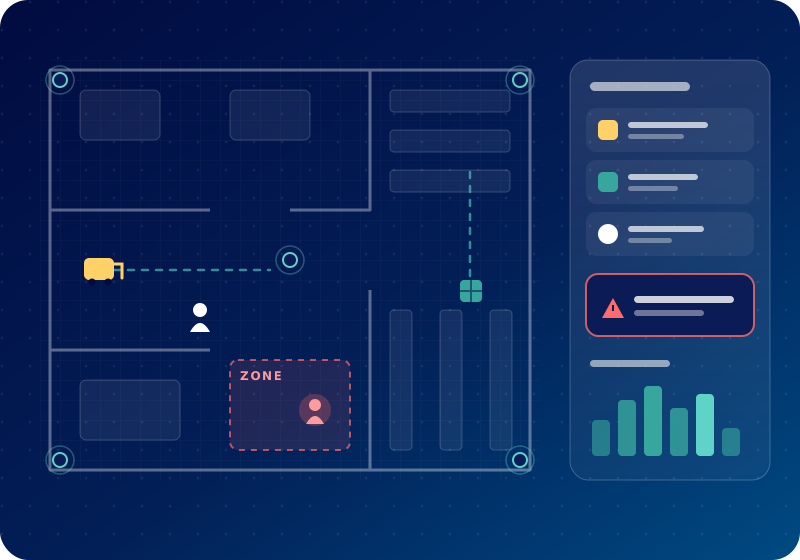
In a factory or warehouse, every minute spent searching for a forklift, a pallet or a tool is a minute lost for production. Our real-time location system (RTLS) makes movements visible across your entire site, indoors and outdoors: you know where every resource is, how long it is being used and where bottlenecks occur.
Hardware, firmware, platform and app: everything is designed and integrated by our team and scales to the size of your site.
Applications
Industry & production
- Real-time location of forklifts, AGVs and industrial vehicles
- Tracking of bins, tools, moulds and fixtures shared between lines
- Work-in-progress tracking: where a production order is, and for how long
- Zone alerts: a vehicle or person entering a defined area
- Equipment utilisation rates to size your fleet correctly
Logistics, warehouses & port areas
- Location of pallets, containers and goods in transit
- Real-time map of storage areas and loading docks
- Measurement of dwell and waiting times
- Full traceability of movements, from goods receipt to shipping
- Alerts when an item or piece of equipment leaves without authorisation
People safety
- Fast headcount of people on site during an evacuation
- Alarm button for lone workers, with location transmitted
- Access to sensitive areas restricted to authorised people
Other sectors
- Healthcare: location of medical equipment, safety of vulnerable patients, hand-hygiene monitoring
- Trade fairs, events and large venues: visitor flow measurement and team coordination
How it works
Tags
Small badges or beacons attached to objects and vehicles or worn by people.
Anchors & gateways
Installed in the building, they pick up the tag signals. Outdoors, the position is transmitted via GNSS/GPS and mobile network.
Platform
Position calculation, site map, history, zones, alerts and statistics – on PC, tablet or smartphone.
Integration
Connection to your ERP, WMS or MES systems and automatic task creation – for example, a pallet idle for more than 2 hours triggers a notification.
Choosing the right technology
| Technology | Typical accuracy* | Ideal for |
|---|---|---|
| BLE (Bluetooth Low Energy) | a few metres | Presence in a zone, large numbers of assets, low cost |
| UWB (Ultra Wideband) | a few tens of centimetres | Forklifts, AGVs, precise safety zones |
| RFID | checkpoint | Gates, docks, stock entries and exits |
| GNSS/GPS + LTE | a few metres (outdoor) | Yards, parks, vehicles, large sites |
* Indicative order of magnitude, depending on environment and installation. We recommend the right technology during the site visit.
Your benefits
- Less time lost searching for equipment and goods
- Better use of your fleet: fewer “idle” assets
- Fewer losses and thefts thanks to alerts
- Full traceability of flows, useful for your customers and audits
- More safety for your teams
Example calculation
10 operators each searching for 20 minutes a day adds up to more than 3 hours lost every day – almost 70 hours a month. This is often where our pilot starts.
Data protection
Locating people involves personal data. We design our solutions in line with Moroccan Law 09-08 and, for our European customers, the GDPR: defined purpose, location limited to the necessary zones and hours, optional anonymisation and information for employees.
Our approach
-
01
Site visit
Flows, zones, assets to track, constraints (metal, WiFi, outdoor areas).
-
02
Pilot in one area
4–6 weeks, a few dozen tags, first measurable results.
-
03
Roll-out
Extension to the whole site and integration with your systems.
-
04
Operation
Support, tag maintenance, new features.
Frequently asked questions
Do we need WiFi everywhere?
No, anchors can run on their own network. We check the best option during the site visit.
Can we start small?
Yes, with a single area or a single asset type – for example forklifts.
Are employees tracked all the time?
No – only where necessary, in defined zones and in compliance with data protection.
Request a demo
We show you the solution in real conditions, on your site or with our demonstrator.
MACHINE MONITORING & RETROFIT
See what is happening on the shop floor in real time – without replacing machines.
A production shop runs machines of different ages and brands. Some are more than 20 years old and have no connectivity at all. OEE is estimated by hand at the end of each shift, stoppages are written on paper and no one really knows which causes cost the most time.
The starting point
- OEE calculated by hand, often days after production
- Stoppage causes recorded incompletely or not at all
- Older machines with no communication interface
- Production meetings based on impressions rather than figures
Our solution
Retrofit module per machine
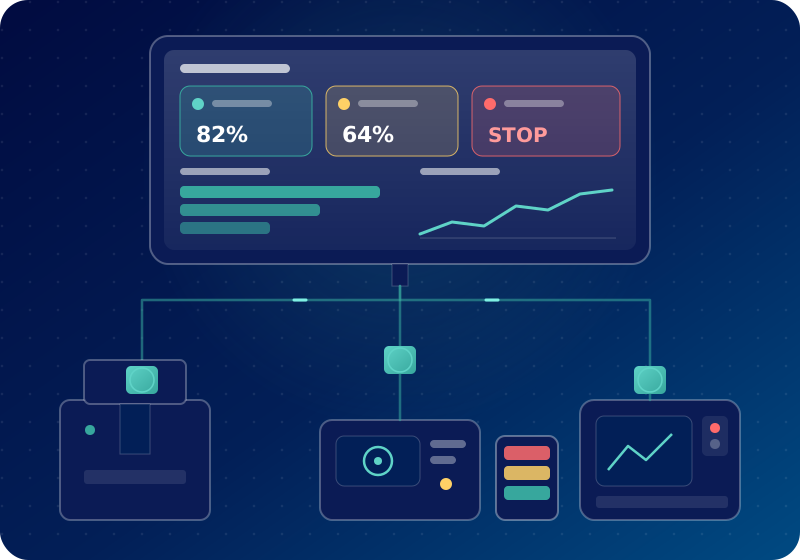
Clamp-on current sensor, part counter and run/stop signal. Installed externally without modifying the machine, during a break or planned stoppage.
IoT gateway
Data from all machines is collected and transmitted via Wi-Fi, cable or mobile network – depending on the site’s infrastructure.
Shop-floor screen & dashboard
Live status of each machine, OEE per machine and per shift, history and alerts – on a large screen, PC or smartphone.
Stoppage cause entry
At each stoppage, the operator selects the cause on a tablet with one tap. The Pareto of causes builds up automatically.
How the pilot runs
-
01
Audit (1 day)
Shop-floor visit, selection of 2–3 pilot machines and the relevant indicators.
-
02
Installation
Modules and gateway installed during planned stoppages, without interrupting production.
-
03
Measurement (4–6 weeks)
First reliable data, first stoppage Pareto, dashboard fine-tuned with your teams.
-
04
Roll-out
Roll-out to further machines or lines and additional functions: energy, predictive maintenance.
What you get
- A real, automatically measured OEE instead of an estimate
- The main stoppage causes visible and quantified
- Immediate alerts for prolonged stoppages
- Production meetings based on shared data
- A data foundation for predictive maintenance and energy monitoring
Technologies
- Non-intrusive current sensors
- Part counters
- IoT gateway
- MQTT
- Web dashboard
- Cloud or on-premises
Frequently asked questions
Do our machines need to be modified?
No. The sensors are fitted externally (for example a clamp around the power cable). The machine and how it runs stay unchanged.
Does it work with machines from different brands?
Yes. The retrofit approach is independent of brand and age. Newer machines that already have an interface can be connected directly.
Where is the data stored?
In the cloud or on a server at your site, according to your requirements. You remain the owner of your data.
Why not start with 2 machines?
We visit your shop floor and propose a pilot tailored to your machines.
Learn more about machine digitalisationThis use case illustrates our approach with a typical scenario. It does not describe a specific customer: results depend on your site and are measured together during the pilot.
PAPERLESS QUALITY CONTROL
From paper sheet to tablet app – with photos, signatures and alerts.
An industrial supplier fills in dozens of paper inspection sheets every day. They are then re-typed into Excel and archived in binders. A non-conformity is often discovered too late, and preparing a customer audit takes hours of searching.
The starting point
- Paper sheets filled in by hand, sometimes illegible or incomplete
- Double entry into Excel and risk of errors
- Non-conformities reported late, sometimes after shipment
- Time-consuming search for evidence during customer and certification audits
Our solution
Inspection app on tablet
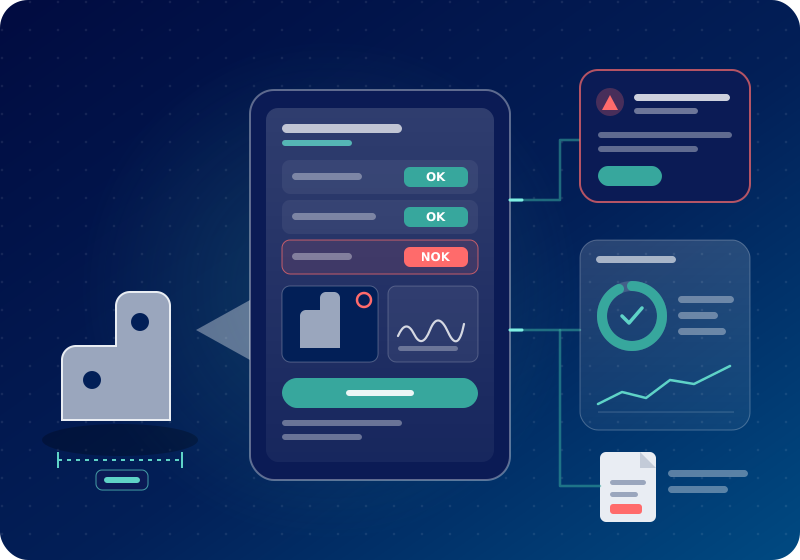
Guided checklist based on your current sheet: mandatory fields, measured values with tolerances, OK/NOK, photos and signature.
Immediate alert
In the event of a non-conformity, the team leader and quality department are notified immediately, with the photo and the affected batch.
Quality dashboard
Conformity rate per line, workstation, product or shift, trends and most frequent defects.
Archiving & reports
Every inspection is time-stamped and found in seconds by batch, date or product. PDF export for your audits.
How the project runs
-
01
Workshop (½ day)
Together we choose the paper sheet that costs the most time.
-
02
Configuration (1–3 weeks)
The sheet becomes an app, with your fields, tolerances and roles.
-
03
Go-live on one line
On-site operator training, in French, Arabic or English.
-
04
Roll-out
Further sheets follow: maintenance, 5S audits, shift handover.
What you get
- No more re-typing: data is available as soon as the inspection is done
- Non-conformities visible the same day
- Complete records thanks to mandatory fields
- Audit evidence available in a few clicks
- Full traceability per batch: who inspected what, and when
Technologies
- Standard smartphones & tablets
- Web app
- Photos & signature
- Barcode / QR scanning
- PDF & Excel export
- Cloud or on-premises
Optional: artificial intelligence
On request, the app can analyse inspection photos to flag visual defects. The final decision always remains with the operator.
Frequently asked questions
Can we reuse our existing sheets?
Yes. We start from your current sheets so your teams feel at home, then improve them together.
Our operators are not comfortable with IT.
The app is designed for the shop floor: large buttons, little text, guided steps. A short on-site training session is usually enough.
Can inspections be linked to machine data?
Yes. For example, an inspection can be triggered automatically after a changeover or a defined number of parts.
Show us a paper sheet
We will show you what it would look like in digital form.
Learn more about process digitalisationThis use case illustrates our approach with a typical scenario. It does not describe a specific customer: results depend on your site and are measured together during the pilot.